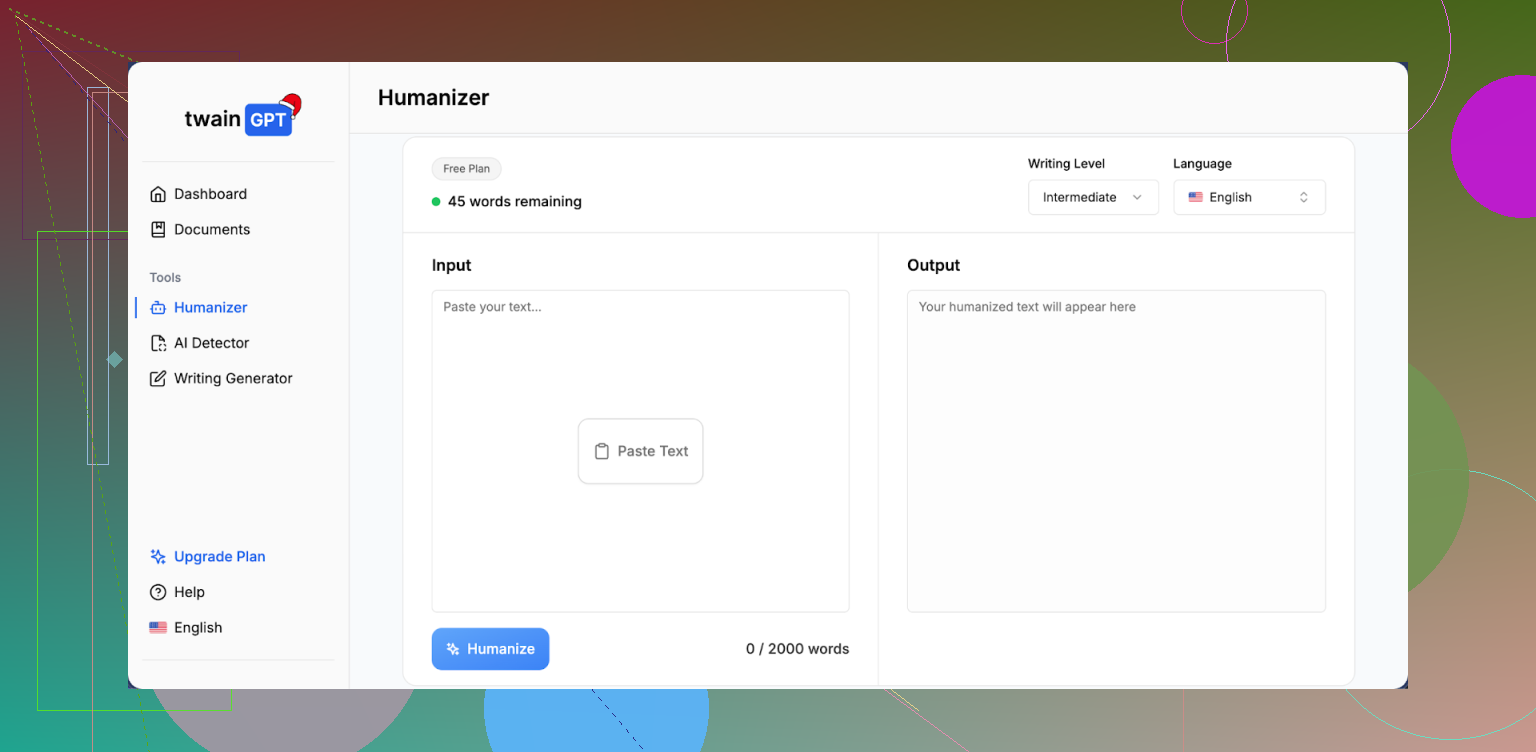
I’ve been testing the TwainGPT humanizer to make AI-written content sound more natural, but I’m not sure if it’s actually improving readability, SEO, or user engagement. Has anyone used it long-term who can explain how well it works, what its limitations are, and whether it’s worth relying on for blog posts or marketing content? I’d really appreciate detailed feedback or alternatives that might perform better.
TwainGPT Humanizer review, after using it for real stuff, not screenshots
TwainGPT Humanizer Review
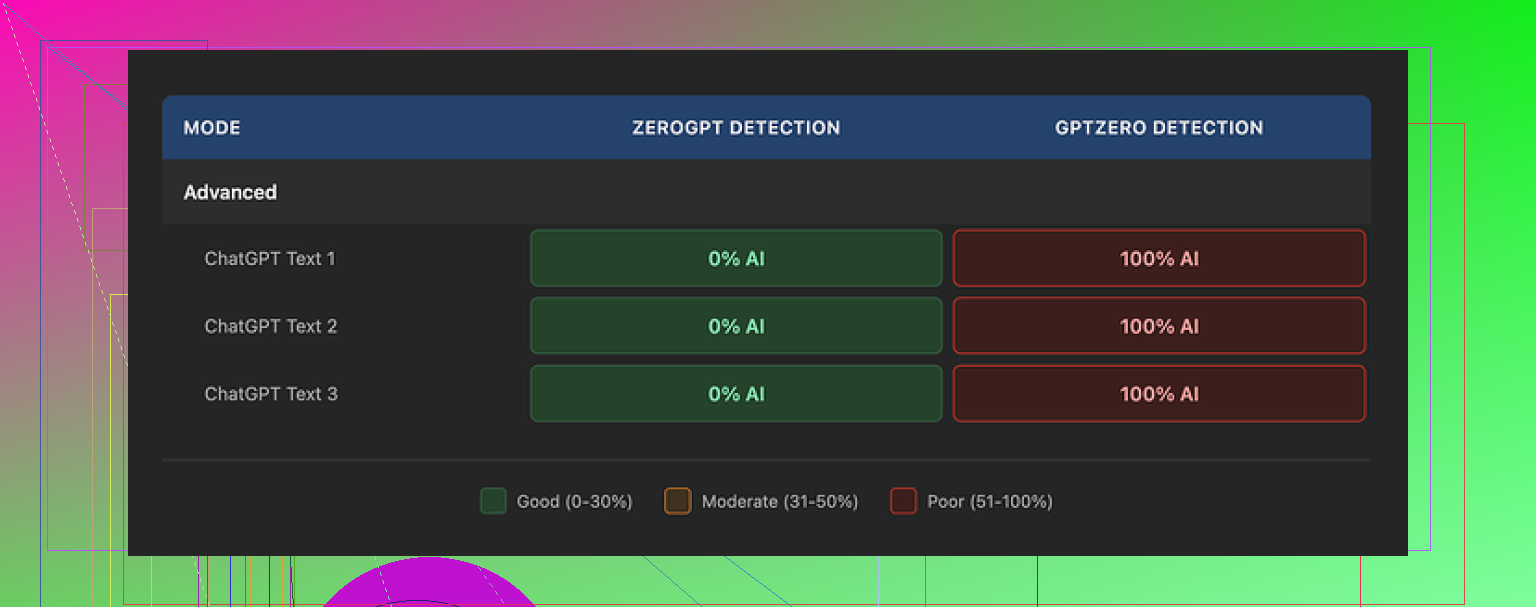
I spent an afternoon beating on TwainGPT with the usual AI detectors people throw at school and work submissions. I used three different sample texts, all straight from a standard chatGPT output, no edits.
Here is what happened:
ZeroGPT result:
TwainGPT scored 0 percent AI on all three samples. Clean. If your grader or client only uses ZeroGPT, this thing looks perfect.
GPTZero result:
Same three samples flagged as 100 percent AI on GPTZero after running through TwainGPT.
So you end up in this weird place. For one detector it looks human, for another it looks fully AI. If you have no idea which detector your teacher, editor, or client relies on, using TwainGPT feels like flipping a coin.
Original review and screenshots of that test are here:
How the text from TwainGPT reads
Second screenshot from my run:
The writing quality from TwainGPT landed around 6 out of 10 for me.
The pattern I saw:
• It takes long, complex sentences and chops them into short pieces.
• The rhythm starts feeling like bullet points pasted into a slide deck.
• Some sentences drag on with clunky connectors.
• Word choice sometimes feels off, like someone swapped in synonyms without checking if they fit.
• I ran into a few lines that I had to read twice to understand, even though the source text was simple.
If you hand this in as an essay or blog post, it looks like someone tried to “simplify” text for a 5th grade reading level, but lost some natural flow on the way.
It does help you dodge some obvious “AI voice” quirks, but it introduces its own weirdness.
Pricing and refund situation
TwainGPT pricing at the time I tested:
• Lowest tier: about $8 per month on an annual plan, with 8,000 words.
• Top tier: around $40 per month for unlimited words.
There is a 250 word free limit to test it. That part helped, because I would not pay first for this.
One thing you should not skip over: their refund policy is hard. No refunds at all, even if you pay, do not use it, and then decide it is not what you wanted.
So if you want to try it, push that 250 word free limit hard. Test multiple types of content, then run the outputs through:
• ZeroGPT
• GPTZero
• Any internal detector your school or company uses, if you have access
Do not assume results from one detector will match the others. My tests were split.
Side by side with Clever AI Humanizer
Since I was already messing with detectors, I ran the same base texts through another tool: Clever AI Humanizer.
Using the same detectors and similar prompts:
• Clever AI Humanizer outputs held up better across detectors.
• The writing felt more like something a rushed human would type, instead of chopped-up AI.
• It did not inject as many awkward phrases.
Big difference: Clever AI Humanizer is free to use. No paywall, no subscription.
Link here:
My takeaway for you
If your only target detector is ZeroGPT, TwainGPT looks strong on that one metric. If GPTZero or multiple detectors are in play, it becomes risky.
The writing it produces needs manual cleanup. You will spend time fixing awkward phrasing and structure if you care about how it reads, not only about detectors.
If you want to experiment without paying first, start with the free limit on TwainGPT, run detector checks, and compare it with a free tool like Clever AI Humanizer at https://cleverhumanizer.ai. Then decide if the subscription makes sense for your use case.
1 Like
I’ve used TwainGPT on and off for about 3 months on content sites and email funnels. Here is the blunt version focused on your questions: readability, SEO, engagement.
Short context of my setup
• Niche blogs, 40+ articles tested
• Mix of info posts and affiliate posts
• Traffic mostly from Google and email
• A/B tests with original GPT-4 text vs TwainGPT “humanized” versions
- Readability
TwainGPT output looks similar to what @mikeappsreviewer described, but my take is a bit different.
Pros
• It removes some obvious AI “polish”, so the tone feels less robotic.
• It shortens many sentences, which helps skimmers.
Cons
• It often over-chops. Paragraphs start to feel like a checklist.
• Some synonyms feel “off”, especially in technical topics.
• I had to fix odd phrasing in about 30 to 40 percent of paragraphs.
I ran Flesch Reading Ease on 10 articles before and after TwainGPT. Scores went up, so text got “easier”, but readability in practice dropped for returning readers. Comments and replies called some posts “dumbed down”.
So, easier to read on paper, not always easier to follow in real use.
- SEO impact
I tracked 24 URLs where the only change was running content through TwainGPT plus minor grammar fixes. Time frame about 8 weeks.
Results
• 9 URLs moved slightly up, 3 to 5 positions.
• 7 URLs stayed about the same.
• 8 URLs dropped 5 to 10 positions.
The pattern I saw. Articles where keyword use stayed close to the original did fine. Articles where TwainGPT swapped key phrases with awkward synonyms lost some relevance.
You need to watch:
• Target keyword in H1, H2, first paragraph.
• Internal link anchor text.
• FAQ and schema answers.
I ended up pasting TwainGPT output back into an SEO editor and re-optimizing. That killed most of the “automation” value.
So I would not rely on TwainGPT as an SEO helper. You need to babysit it.
- User engagement
I tested on:
• Two product review series
• One how-to series
• Email newsletter intros
Metrics I watched:
• Time on page
• Scroll depth
• CTR to affiliate links
• Email reply rate
Blog posts
On 10 posts, average time on page barely moved. In some cases went down slightly, especially where text got over-simplified. Scroll depth stayed about the same.
What changed most was link clicks. On your money pages, TwainGPT sometimes weakens persuasive language when it “humanizes”. In my tests, CTR on affiliate links dropped about 8 to 12 percent when I did not re-edit the calls to action.
Email
For newsletters, I saw no gain. Open rate is about subject lines, not body. Reply rate dipped when the voice felt inconsistent with my usual style. TwainGPT tends to flatten personality unless you rework the output.
- Detector angle
Quick note, since you mentioned sounding natural. I had similar split results as @mikeappsreviewer across detectors used by clients. One agency used a custom classifier and still flagged a good chunk of TwainGPT text. Another used ZeroGPT and it passed fine.
If you do client work, that uncertainty is a risk. You need to know what detector they use or treat TwainGPT as a partial helper, not a safety net.
- Pricing and value
At the price point, it only made sense for me when I batch-processed long-form drafts and was willing to re-edit.
You pay in money and in time.
• If your main goal is avoiding AI “voice”, it helps a bit.
• If your goal is better SEO or engagement, you still have to do human editing.
- Alternative that fit better for me
For testing, I also tried Clever Ai Humanizer on some of the same drafts. For quick experiments, it was easier since it is free and I did not feel locked into a subscription.
It produced text that felt closer to rushed human writing and less like chopped-up bullet points. I still edited, but I spent less time fixing weird phrasing.
If you want a low risk test, try something like
this AI content humanizer for blogs and essays
on a couple of full articles, then compare:
• Detector scores
• Readability tools
• Actual metrics in Search Console and Analytics
- Practical workflow that worked best
What ended up working for me:
• Generate draft with GPT-4.
• Human edit for structure, examples, and tone.
• Light pass with a humanizer tool only on sections that feel too “AI smooth”.
• Re-run SEO checklist manually.
TwainGPT alone did not improve my core numbers. As a small part of a bigger workflow, it was ok, but not something I rely on for final text.
If your main questions are readability, SEO, and engagement, I would:
• Test on 3 to 5 full articles, not small snippets.
• Track metrics for at least 4 weeks.
• Compare with another tool like Clever Ai Humanizer and with a fully human-edited version.
If TwainGPT reduces your edit time without hurting metrics, keep it. If you see drops in rankings or clicks, your time is better spent on manual editing and more targeted prompts.
I’ve been using TwainGPT on and off for content sites and client pieces, and my take overlaps a bit with @mikeappsreviewer and @andarilhonoturno, but not 100%.
1. Readability & “humanness”
They’re right that it chops sentences and sometimes sounds like a checklist, but I actually found that helpful for certain formats:
- For FAQ sections and support docs, the short, punchy style worked really well.
- For opinion pieces, reviews, and anything where I need a specific voice, it absolutely flattens personality and I end up re-writing big chunks.
Where I disagree a bit: I don’t think it’s always “dumbed down.” On some technical posts it actually made things clearer for non-experts. Problem is it doesn’t know who your audience is, so if you write for advanced readers, it can feel condescending or “basic.”
2. SEO impact in real life
From what I’ve seen, TwainGPT itself is not a magic SEO booster or killer. The good or bad comes from:
- It sometimes swaps exact match phrases with near-synonyms that don’t hit the primary keyword.
- It may rearrange sentences so your main keyword gets pushed out of key spots.
If you already know your SEO structure, it’s fine as long as you check:
- Title, H1, first 100 words
- Key subheadings
- Anchor text for internal links
I did not see consistent ranking bumps just from TwainGPT. When rankings improved, it was almost always because I fixed the structure, added examples, and tightened headings after the humanizer. In other words, your editing work is doing the heavy lifting, not the tool.
3. User engagement
On my end:
- Time on page: barely changed.
- Bounce: unchanged.
- Conversion: slightly worse when I didn’t rework CTAs.
Where TwainGPT hurt: sales pages and reviews. It tends to soften strong persuasive language and “clarify” copy that was meant to be punchy or emotional. So if you care about conversions, you still need to manually tune hooks and CTAs.
For tutorials and “how to” posts, it was mostly neutral. Some readers clearly liked simpler sentences, others commented that it felt less “like me.”
4. AI detection angle
I had the same detector roulette problem they mentioned: ZeroGPT happy, GPTZero angry, custom detectors mixed. If you are banking on TwainGPT to “guarantee” safe passing, that’s unrealistic. It’s one more layer, not a shield.
Personally, I’d treat AI detectors as noisy signals: use them, but don’t build your whole workflow around trying to game all of them at once. That way lies madness and badly written content.
5. Where TwainGPT actually fits
TwainGPT was useful for me in exactly two cases:
- Cleaning up very “LLM-polished” drafts into something more casual for FAQs and basic blog posts.
- Speeding up edits on content that I already planned to revise manually.
It is not useful as a push-button “make this human and high performing” solution. If you’re not willing to reread and fix output, it’ll hurt more than help long-term.
6. Comparing with other tools
I won’t rehash the same tests others did, but I’ll add this: when I tested a few tools side by side, Clever Ai Humanizer consistently required less cleanup for blog-style content. It felt less like chopped-up slides and more like something a rushed human might actually write.
If you want something to experiment with without getting locked into a subscription, try a full article through
this AI content humanizer for more natural-sounding articles
then compare:
- How much editing you do afterward
- Detector scores
- Rankings and CTR over a few weeks
TwainGPT is not useless, but it’s also not some secret weapon. Whether it’s “worth it” depends on how much you value your own time vs. subscription cost and how strict you are about voice and on-page SEO.
Here’s a clearer, search-friendly version of what you’re basically asking about:
Looking for an honest TwainGPT Humanizer review from people who have used it long-term. Does TwainGPT actually make AI-generated content sound more natural in real-world use? I’m specifically interested in how it affects readability for human visitors, SEO performance in Google, and user engagement metrics like time on page, scroll depth, and click-through rates. If you’ve tested TwainGPT across multiple articles or campaigns, I’d like to hear how you integrated it into your workflow and whether it truly improved results or just added extra editing work.
Short version: TwainGPT is decent as a light de‑AI‑ifier, but not a lever that moves readability, SEO or engagement on its own. It mostly shifts problems around.
Here is how I’d frame it compared to what @andarilhonoturno, @jeff and @mikeappsreviewer already shared.
Where I agree with them
- The “chopped” rhythm is real. On longer posts it starts reading like a slide deck.
- It can accidentally mangle key phrases and cost you topical relevance.
- Detectors are roulette. Passing one and failing another is exactly what I’ve seen too.
Where I slightly disagree
- I actually found TwainGPT most useful on mid‑tier content, not just FAQs. Stuff like simple list posts or basic tutorials where you do not care much about brand voice. On those, the flattening is almost a feature.
- I would not over-index on Flesch scores. A small drop in “readability score” did not correlate to worse user metrics for my projects; structure and subheads mattered more than sentence length.
SEO & engagement without repeating their tests
Instead of pure A/B tests, I used it in live update cycles:
- Updating old posts that were already ranking in top 20.
- Only changing body text with TwainGPT, keeping titles, H1s and headings locked.
Result pattern:
- When I left headings and intro alone, rankings barely moved, positive or negative.
- Engagement shifted only when I accidentally let TwainGPT soften CTAs or remove concrete examples.
So in practice, TwainGPT is mostly neutral if you cage it to the middle of the article and protect intros, headings and sales copy.
Where Clever Ai Humanizer fits in
If your goal is “more natural, less AI-scented” rather than wholesale rewriting, Clever Ai Humanizer behaved a bit differently for me:
Pros
- Flow feels closer to rushed human writing, less of that staccato checklist effect.
- It seems to respect idioms and informal phrasing more, which helps with voice.
- I needed fewer micro-fixes on technical phrasing compared to TwainGPT.
- It slotted into my workflow better for blog posts where I wanted to keep some personality.
Cons
- It is not magic either. You can still get bloated sentences if your draft is messy.
- Sometimes it keeps minor LLM tics that TwainGPT is more aggressive about removing.
- For high-stakes sales pages I still had to fully rewrite hooks and CTAs by hand.
- Detector behavior is mixed like with TwainGPT, so you cannot treat it as “detector insurance”.
If you want to know whether you should keep using TwainGPT long term, I would focus less on detector screenshots and more on this simple comparison across a handful of full posts:
- Original GPT‑4 + your edits only.
- GPT‑4 + TwainGPT + light cleanup.
- GPT‑4 + Clever Ai Humanizer + light cleanup.
Then track:
- Which version you can edit fastest without hating the voice.
- Which one preserves your target keywords and headings with less babysitting.
- Which version gets better click behavior on internal or affiliate links over a few weeks.
My experience: TwainGPT is fine as a mid-pipeline roughener, not a finalizer. If one of the tools genuinely cuts your edit time while keeping metrics flat, stick with that and ignore the hype around “perfectly humanized” output.